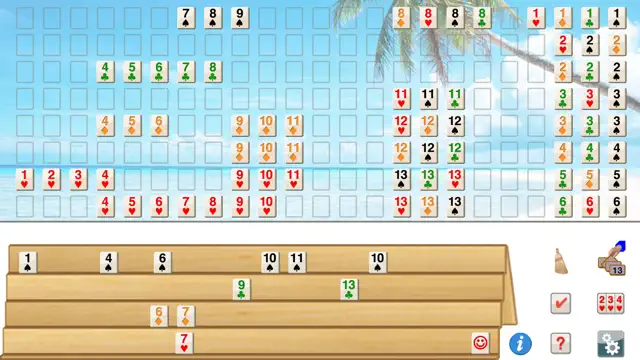
Romi Pro is a fantastic digital adaptation of Rummy Tile games (similar to Rummikub). For fans of the board game, this is an excellent way to practice. The AI is quite formidable, particularly on the higher settings, where it seems to calculate every possible combination in an instant. This forces you to be much more strategic with how you hold and play your tiles.
The 'Pro' version is worth it for the cleaner interface and lack of distractions. The drag-and-drop interface for moving tiles around the board works well, and the game does a great job of highlighting where a tile can be legally placed. Itβs a quiet, cerebral game thatβs perfect for long flights or commutes when you want to engage your brain without needing an internet connection.
Available on: iPhone, iPod
Version 2.9.9Sat Dec 01 2018
Minor bugs fixed.
Romi lets you play Rummy Tile (RummyCube, Rummikub, Rami) games against the computer at three different levels.
Romi is played with two sets of 52 cards and with two wild cards. The purpose of this game is to form groups of three or more cards, which contain either consecutive cards of the same suit or cards of the same number value but of differing suits.
Requires iOSΒ 8.0 or later. Compatible with iPhone, iPad, and iPodΒ touch.Romi lets you play Rummy Tile (RummyCube, Rummikub, Rami) games against the computer at three different levels.
Romi is played with two sets of 52 cards and with two wild cards. The purpose of this game is to form groups of three or more cards, which contain either consecutive cards of the same suit or cards of the same number value but of differing suits.

Romi Pro allows you to play the popular Rummy Tile game against 3 levels of computer difficulty. The game follows the standard rules: create sets of three or more consecutive numbers of the same color, or groups of the same number in different colors. With a smooth interface and challenging AI, Romi Pro is perfect for fans of tile-based strategy.
Three levels of AI difficulty
Save and resume game state
Clean, distraction-free 'Pro' interface
Automatic tile sorting options
Don't always play every tile you can. Sometimes it's better to hold onto a tile to wait for a better opportunity or to prevent the AI from using your move to their advantage.
Drag tiles from your rack to the board to form groups or runs. You can also manipulate existing sets on the board to incorporate your tiles, provided all sets remain valid.
The first player to play all the tiles from their rack onto the board wins the round.