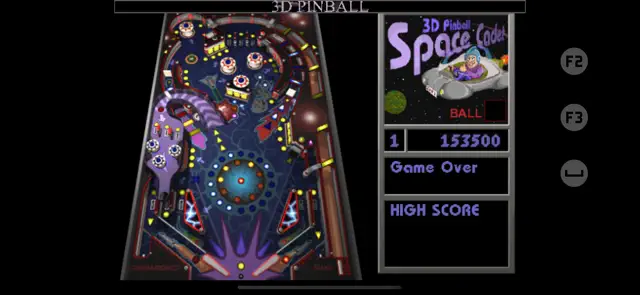
3D Pinball: Space Cadet is a masterfully executed nostalgia trip that brings the iconic Windows 95 experience to the palm of your hand. For those who spent hours avoiding homework in the late 90s, this port is a dream come true. The physics engine feels authentic to the original, capturing that specific 'clunky yet satisfying' gravity that defined the Space Cadet table. The lighting effects on the bumpers and the classic MIDI soundscape are preserved perfectly, creating an immersive retro atmosphere.
What makes this version stand out is how well the touch controls have been integrated. Tapping the sides of the screen to activate the flippers feels natural, and the haptic feedback adds a tactile layer that the PC version obviously lacked. While it remains a single-table experience, the depth of the missions—ranking up from Cadet to Fleet Admiral—provides a surprisingly high ceiling for skill. It is a pure, unadulterated arcade joy that proves great game design is timeless.
Available on: iPhone, iPod
Version 3Tue Dec 16 2025
We’ve updated the app with a new “Remove Ads” In-App Purchase.
The table features the player as a member of a space fleet that completes missions to increase rank. Players can attain nine different ranks (listed from lowest to highest): Cadet, Ensign, Lieutenant, Captain, LT Commander, Commander, Commodore, Admiral, and Fleet Admiral. Players accept a mission by hitting "mission targets" which select which mission they will take, and by going up the "launch ramp". Each mission has a set number of things for players to do, such as hitting the "attack bumpers" (which are a set of four bumpers at the top of the table) eight times (this is the "target practice" mission). Some missions involve a number of steps which must be completed in sequence. Missions end either by being completed, or by being aborted due to running out of "fuel", as indicated by the lights in the passage that passes under the launch ramp. The "fuel" lights go out one by one at a time interval, and can be re-lit by having the ball go over them, or all at once by going up the launch ramp again. Upon completing a mission, some of the blue lights in a circle in the middle of the table turn on. When all of the lights in the blue circle turn on, the player's rank increases, and a light in the orange circle turns on.
Requires iOS 15.6 or later. Compatible with iPhone, iPad, and iPod touch.The table features the player as a member of a space fleet that completes missions to increase rank. Players can attain nine different ranks (listed from lowest to highest): Cadet, Ensign, Lieutenant, Captain, LT Commander, Commander, Commodore, Admiral, and Fleet Admiral. Players accept a mission by hitting "mission targets" which select which mission they will take, and by going up the "launch ramp". Each mission has a set number of things for players to do, such as hitting the "attack bumpers" (which are a set of four bumpers at the top of the table) eight times (this is the "target practice" mission). Some missions involve a number of steps which must be completed in sequence. Missions end either by being completed, or by being aborted due to running out of "fuel", as indicated by the lights in the passage that passes under the launch ramp. The "fuel" lights go out one by one at a time interval, and can be re-lit by having the ball go over them, or all at once by going up the launch ramp again. Upon completing a mission, some of the blue lights in a circle in the middle of the table turn on. When all of the lights in the blue circle turn on, the player's rank increases, and a light in the orange circle turns on.


3D Pinball: Space Cadet brings the most famous pinball game in history to iOS. Originally a staple of the Windows operating system, this mobile version features the full 'Full Tilt!' table experience. Players must complete a series of space missions by hitting specific targets and ramps to increase their rank. Featuring high-fidelity retro graphics, classic sound design, and smooth 60 FPS gameplay, it's the definitive way to play Space Cadet on the go.
Authentic Win95 Table Physics
Retro MIDI Soundscape
Haptic Touch Integration
Global High Score Leaderboards
To increase your rank quickly, focus on the 'Mission Selection' targets on the left side. Once a mission is active, follow the flashing lights on the ramps to complete objectives. Completing 'Wormhole' missions provides the highest score multipliers.
Control the plunger by holding the screen; release at the right moment to hit the top arch for a 'Skill Shot' bonus. If the ball is draining down the side, use the 'Nudge' feature (tilt or swipe) to bump it back into play, but be careful of a Tilt!
This app is dedicated specifically to the Space Cadet table to ensure the most accurate emulation possible.