
Thumb Drift - Furious Racing is a free one-thumb arcade drifting game from SMG Studio, the Australian indie studio behind Moving Out and Death Squared. There are no opponents, no finish line and no career mode: you slide a car sideways down an endless track, grab coins, dodge walls, fences, boxes and the occasional cow, and see how far you get before you hit something and your car explodes into dozens of pieces. It launched in February 2016, was an App Store Editor's pick in its first month, and is still on the store in version 1.7.5 — though that version is now two years old, which matters, and I flag it below.
This guide teaches the whole game in order, phase by phase, because there are no levels to walk through one by one — it is an endless score chaser. Where a step comes from the App Store listing, a player guide or player reviews, I say so. Where sources disagree, I say that too, instead of picking one version and pretending the other does not exist. Our Dinsun critic scored Thumb Drift 54 out of 100 and called it "a stylish, distraction-heavy arcade racer that trades technical depth for a thumb-cramping difficulty curve", praising the controls and the crash physics most while marking down gameplay, fun and mechanics (5, 5 and 4 out of 10) for a repetitive, trial-and-error loop. My own verdict is below, and it is not the same as Dinsun's.
Quick Facts
Developer: SMG Studio (SMG STUDIO PTY LTD) | Price: Free, with in-app purchases | App Store rating: 4.3 out of 5 (about 3,800 ratings in the US) | Size: about 227 MB | Requires iOS 13.0 or later | Age rating: 4+ | Version 1.7.5, last updated 8 November 2024 | Game Center leaderboards included. In-app purchases on the App Store page: Go Premium $1.99, Piggy Bank Vehicle (Coin Doubler) $1.99, car packs $3.99 each (JDM, Drift, Classic, Muscle and WTF packs), single cars $0.99–$1.99. Ads: the App Store page I read does not list advertising in its information section, but Dinsun and the player guides both report ads — mainly an optional video after a run to double your coins — so expect them.
Get Thumb Drift - Furious Racing on the App Store
This is an unofficial fan guide and is not affiliated with SMG Studio. Steps were checked against the App Store listing, the TouchArcade and Gamezebo reviews, the Pocket Gamer review, the Level Winner, Touch Tap Play and iFanzine player guides, and the game's Wikipedia page. Most of the player guides date from 2016, when the game launched, so where a detail may have changed in later versions I say so. The game changes with updates, so treat this as a working route through the game, not gospel.
Watch the game first
If you have never seen the game, this is the official trailer from SMG Studio's own channel. It shows the one-thumb drifting, the low-poly tracks and the car variety in about a minute, with no spoilers — there is no story to spoil. Click the picture to watch on YouTube.
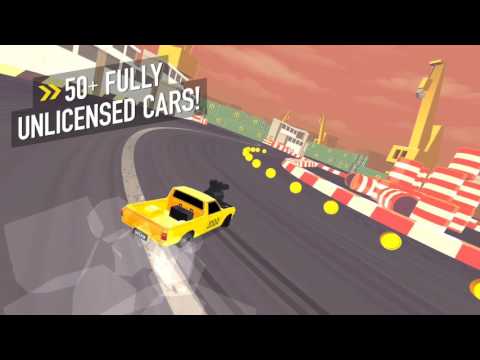 ▶
Watch: Thumb Drift Trailer (SMG Studio)
For the controls themselves, this second video is SMG Studio's own short "How To Play" tutorial, which demonstrates the one-thumb steering better than any paragraph can. Watch it once before your first run. Click the picture to watch on YouTube.
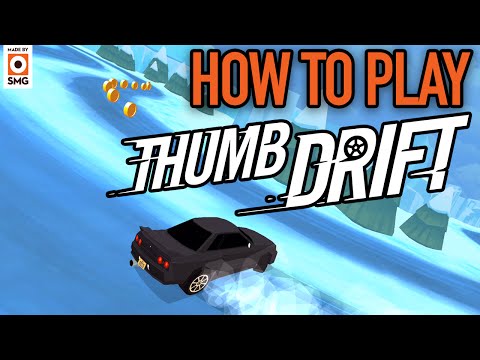 ▶
Watch: Thumb Drift - 'How To Play' Tutorial (SMG Studio)
One warning about videos: there is no single complete beginner video walkthrough of this game on the official channel, so the two videos above are a trailer and a controls tutorial rather than a start-to-finish playthrough — which fits a game with no levels and no ending. Do not confuse this game with Drift Max Pro, Drift Legends or any other drifting game with a similar name; this one is the SMG Studio game with the flat-shaded low-poly cars that shatter on impact.
Strategy 1: Small movements only — never sweep
The single most important rule in Thumb Drift, and every player guide agrees on it: keep your thumb movements small and gentle. Dragging your thumb left or right along the bottom of the screen swings the rear of the car out in that direction — that is the drift — and a big sweep sends the car into a constant swerve while you fight to correct it. Small taps and short drags are enough to hold a slide. If you find yourself sawing your thumb back and forth, you are over-steering; slow down, make the next input half as big, and let the car settle. The game rewards control, not enthusiasm.
Strategy 2: Lift your thumb to straighten out
Your second control is doing nothing. If you take your finger off the screen, the car slowly straightens itself out. That is your reset button, and it is the most underused move in the game. When you have lost control in a gauntlet of turns, or you are sliding toward a wall with no good angle, lift your thumb, let the car settle for half a second, and re-enter the next corner clean. It costs you a little speed and a few coins, but it saves the run — and a saved run always beats a spectacular crash. Practice this deliberately in your first ten runs until it is muscle memory.
Strategy 3: Treat coins as bait, especially early on
Coins sit on the track in tempting strings, and following them is the fastest way to die. Player guides are blunt about this: the coin lines often lead straight into a wall, and your best early runs will be the ones where you ignore the coins and concentrate on not hitting anything. Coins matter — they buy the cars — but you pick up a decent amount just by driving well, and a long run pays more than a short greedy one. Learn the track first, chase coins second. Once you can reliably survive a full minute, then start weaving for the coin strings that sit on safe lines.
Strategy 4: Do the mission on every run
Every run starts with a mission — drive a certain distance, collect a certain number of coins, drift for so many yards — and finishing it pays a chunk of bonus coins on top of what you collected. The guides put a typical mission reward at around 50 coins, though that figure is from 2016 and may have changed. Missions are not tied to a track, so if one is giving you trouble, switch tracks and try it somewhere easier. The mission is the most reliable income in the game, more reliable than coin-grabbing, so read it before you start each run and play toward it instead of just surviving.
Strategy 5: Play free, but expect the grind — and the ads
Be honest with yourself about the deal. This is a free game you can enjoy without spending anything — the cars are cosmetic, per the Pocket Gamer review, so no purchase makes you faster — but unlocking all 100+ cars by playing alone is a long grind, and the game will offer you shortcuts. After a run you may be offered an ad video to double your coins; the 2016 guides advise saving that for your best runs, when the doubled amount is actually worth the wait. The $1.99 Go Premium purchase and the $3.99 car packs are the honest way to skip the grind if you want a specific car. Do not buy coins to chase a score — the score comes from practice, not from the garage.
Walkthrough 1: Your first session — Gymkhana, your first drift, your first crash
Download the game (about 227 MB, iOS 13 or later) and open it. Your first track is Gymkhana, and it is the only track with a fixed layout — the later tracks randomise, per the Touch Tap Play guide — so it is the best place to learn. Place your thumb on the bottom of the screen and drag left or right: the rear of the car swings that way and you start to drift. Your car accelerates on its own; your only job is steering. Aim to survive the first few corners, grab the coins that sit on your line, and do not panic when the track narrows. You will crash — everyone does, usually within the first thirty seconds — and when you do, the car shatters into pieces in the game's Carticle technology and your points and coins are tallied. That is the whole loop. Run it five or six times before you try to be clever: the goal of this session is to learn what a controlled drift feels like, not to set a record.
Walkthrough 2: Learning the drift — corners, straights and the straight line
Once the controls click, the real skill is line choice. On a straight, stay in the middle of the track and keep the car as straight as you can — drifting on a straight bleeds speed and pushes you toward the edges for no benefit. On a corner, start the drift early with a small input, hold the slide through the apex, and straighten out with a thumb-lift as you exit. The guides agree on one counter-intuitive point: try to drift in as straight a line as possible through the turn, hugging the inside rather than swinging wide, because the wide line is where the walls and obstacles live. Gymkhana's fixed layout is your training ground — run it until you can picture the next three corners before you reach them. That memorisation is the closest thing this game has to a level walkthrough, and it only works on the first track.
Walkthrough 3: Missions, coins and your first new cars
From your second session onward, play with the economy in mind. Read the mission at the start of each run and finish it — distance missions are the easiest, coin missions need you to take some risks. Bank the coins and spend them in the garage: new cars cost coins, and the roster runs to over 100, from street tuners and muscle cars to tanks, ice cream trucks and guest cars from drifting YouTubers and creators like Cleetus McFarland, Adam LZ and 1320 Video, all listed on the App Store page. Remember that the cars are cosmetic — the Pocket Gamer review is clear that none of them handle differently — so buy the one you like the look of, not the one you think is fastest. The 2016 guides also say a free car arrives every couple of hours if you leave notifications on; that detail is a decade old and may have changed, so treat it as worth checking rather than a promise. And after a good run, take the ad-video coin doubler — that is the one time it pays.
Walkthrough 4: Unlocking the other tracks
There are four tracks in total, and you unlock them by drifting distance, not by winning anything. The Level Winner guide gives the first example: Forest Road unlocks once you have drifted 2,000 yards in Gymkhana. That number is from 2016 and later versions may have changed the thresholds, but the mechanism — distance unlocks — is confirmed by multiple guides. Forest Road is worth the effort for one reason the guides call out: you can drift on the grass without losing speed, which changes how you take its corners. The other two tracks unlock the same way, by total drifting distance, and beyond the scenery change they do not offer new mechanics — the Pocket Gamer review is honest about that. Swap tracks freely: missions are not track-specific, so if a mission is hard on one track, try it on an easier one, and use Gymkhana whenever you want a predictable layout to practise on.
Walkthrough 5: Chasing the Score Register — from Sunday Driver to 600+
The long game is the Score Register printed on the App Store page: 0–50 is L plater, 51–99 Sunday Driver, 100–199 Training Wheels, 200–299 Gettin' Sideways, 300–399 You feel the need for speed, 400–499 You're in the red, 500–599 Flat out!, and 600+ is "You live your life a quarter mile at a time! Dom will be proud". Your score is your distance and drift total for a single run, so the climb is pure consistency: clean corners, no wasted slides, no coin-chasing detours. Getting past 200 means you can survive a full minute without a mistake; getting past 400 means you can do it while collecting coins and finishing missions at the same time. Game Center leaderboards let you compare with friends, which is the game's only multiplayer — there is no racing against other people, live or otherwise. One honest flag: version 1.7.5's update note says "New cars, tracks and modes coming 2025!", but no newer version has appeared on the App Store as of November 2026, so do not plan around new content arriving.
Stuck? A short checklist before you look anything up
First, if you keep crashing on the same corner, shrink your inputs — the most common cause of a crash is over-steering, not under-steering, and the fix is smaller thumb movements, not bigger ones. Second, if you are sliding out of control, lift your thumb and let the car straighten before you touch the screen again. Third, if you are dying while chasing coins, stop chasing them for five runs and watch your distance double — the coins will still be there when you are ready. Fourth, if a mission feels impossible on your current track, switch tracks: missions are not track-specific, and Gymkhana's fixed layout is the easiest place to finish a distance mission. Fifth, if the game feels stale, remember the cars are cosmetic — a new car will not fix a plateau, only practice will. And if a step above does not match what you see, check the two videos — the official tutorial shows the controls as they actually work.
My verdict, not Dinsun's: Dinsun scored this 54 out of 100 and called it a shallow, frustrating toy. I think that is too harsh. The 4.3-star App Store rating from about 3,800 US players, TouchArcade's 4½ stars and the Gamezebo and Pocket Gamer reviews all point the same way: this is a polished, genuinely satisfying arcade toy — one clever control idea, executed well, with a clean look, a pumping soundtrack and crash physics that never get old. But Dinsun is right about the limits: there is no depth here, no opponents, no finish line, and unlocking 100+ cars by grinding coins and watching ads is a slow business. So download it free if you want a two-minute score chaser for a commute or a queue — and skip it if you want a real racing game with tracks to master, rivals to beat or a career to finish. Play it free for a week, and let your Score Register rank decide for you.
What is your best score — have you made it past Gettin' Sideways, or all the way to 600+? Tell us in the comments — and if you want the next walkthrough, tell us which game from our iOS list you want covered next.