
That Level Again is a small logic game from independent developer Nurkhametov Tagir (known as IamTagir), and it has one of the cleverest ideas on the App Store: every level takes place in the exact same room — spikes on the floor, a platform, a red button and a door on the right — but the way to open the door changes every single time. You play Afonya, an immortal hero who gets up again after dying, and dying is often part of the solution: your corpse can hold a button down while you walk through the door. The App Store description still says 96 levels, but that is out of date — the current version (1.75, December 2025) has 109 levels, according to Google Play and the fan wiki, and the update notes mention new text after level 98.
This guide gives the solution to levels 1 to 80, step by step, from the published walkthrough at walkthroughs.net, which matches the fan wiki's level names. Levels 81 to 109 are listed by name only, because no published step-by-step walkthrough covers them yet — I say so below instead of guessing. Our Dinsun critic scored That Level Again 78 out of 100, praising the meta-puzzles and the "Aha!" moments and warning that it is short with no replay value once you know the answers. My own take, after checking the listing, the walkthroughs and the player reviews: I agree it is a genuinely clever little game and it is free, so there is no reason not to try it — but go in knowing the later levels can be unguessable without a hint, a few levels have reported bugs, and the ad load has crept up in recent reviews. One thing in the Dinsun file is plainly wrong: it lists the value proposition as "Buy Full Price", which makes no sense for a free download — this game costs nothing to play.
Quick Facts
Developer: Nurkhametov Tagir (IamTagir) | Price: Free | App Store rating: 4.7 out of 5 (8,101 ratings, US) | Size: about 156 MB | Requires iOS 15.0 or later | Age rating: 9+ | Levels: 109 in the current version (the App Store description still says 96) | Playtime: the Dinsun file says 1–2 hours, which looks short for 109 levels — one Google Play reviewer says they beat it in 2 days. Version 1.75 (19 December 2025) is the current version; the game was first released on 14 July 2015. A single "Remove ads" purchase of $1.99 is reported by appshunter — it does not appear in the App Store data I can check, so confirm the price in the app before buying.
Get That Level Again on the App Store
This is an unofficial fan guide and is not affiliated with Nurkhametov Tagir or IamTagir. The level solutions come from the published walkthrough at walkthroughs.net, cross-checked against the That Level Again fan wiki and a second walkthrough at showgamer.com. Where the sources disagree, I say so instead of picking one. The game can change with updates, so treat this as a working route through the game, not gospel.
Watch the game first
There is no official trailer for this game, so here are two real gameplay videos of the original That Level Again — not the sequels — both checked on YouTube. The first is a longer play session that shows the same-room idea and the way the tricks keep changing; the second is a single level, level 91, played through. Click a picture to watch on YouTube.
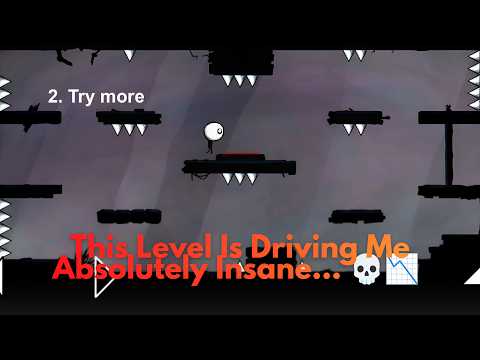 ▶
 ▶
Watch: That Level Again - Level 91 completed — Number4 (single-level gameplay)
One honest note: the second video shows only level 91, not a full walkthrough, and I could not find a complete video walkthrough of all 109 levels — so the step-by-step solutions below come from the written walkthroughs, not from video.
Strategy 1: Learn the room once — it never changes
Every level is the same room: spikes on the floor, a platform or two, a red button and a door on the right. Learn that layout once and you never have to learn it again — what changes is the trick, not the room. When you start a level, spend a few seconds looking before you move: is there a button at all, is the door already open, are the controls behaving normally? The answer to those three questions usually tells you which family of trick you are dealing with, and it stops you wasting jumps on a level that needs you to do nothing at all.
Strategy 2: Dying is a tool, not a failure
Afonya is immortal: he dies on the spikes and gets straight back up. That is not just flavour — in several levels your corpse is the solution, because a dead body lying on a button holds it down while you walk through the door. If a level has a button you cannot reach and stay on at the same time, ask yourself whether dying on top of it would work. Levels 5, 33, 44 and 65 all use this idea, and it is the first thing to try whenever a level seems physically impossible.
Strategy 3: Think outside the game — your phone is part of the puzzle
This is the game's signature idea, and the Dinsun review's "you might find yourself messing with your phone's volume or brightness" is literally true. Some levels are solved in the game, and some are solved on the device itself: turning the volume down (level 39), switching on airplane mode (level 30), turning on Bluetooth (level 76), muting the sound in the menu (level 24), tilting or shaking the phone (levels 27, 28, 36, 71), and tapping the button with your finger instead of walking the character onto it (level 3). If a level feels unsolvable inside the room, the answer is probably a setting, a gesture or a button on your phone. One warning: a few players report that level 30 sometimes does not register airplane mode, so if it does not work, try toggling it off and on again and re-entering the level.
Strategy 4: Read the level title — it is usually the hint
Almost every level is named after its trick, and the name is the biggest free hint in the game. "Try Dying" means die on purpose. "Don't Touch It" means the door is already open. "Volume" means use the volume buttons. "Password 1234" tells you the password is 1234. "Traffic Light" means move only on green. When you are stuck, read the title out loud and ask what it would mean as an instruction — it is right more often than it has any business being. The titles are also how I checked the numbering in this guide: the walkthrough I used matches the fan wiki's level names, while an older walkthrough at showgamer.com numbers some early levels differently, so I followed the one that matches the names.
Strategy 5: Use hints when you are stuck — but know what they cost
The full game is free and no level is locked behind a payment; the only money involved is watching ads for hints and a reported one-off $1.99 purchase to remove ads. Older player reviews say the ads were minimal — "the only ads you watch are if you want a hint" — but a January 2026 review says hints now usually cost two or three ads, and sometimes the hint just repeats the level title, which is no help at all. So use the in-game hint button when you are genuinely stuck, but check this guide first: it costs you nothing, and the solutions below are the same ones the hint would point you towards. If the ads bother you, the $1.99 remove-ads purchase is reported by appshunter, but it does not appear in the App Store data I can check — confirm the price in the app before buying.
Walkthrough 1: Levels 1–20 — learning the tricks
The first twenty levels teach you the game's vocabulary, one trick at a time. Solutions from walkthroughs.net.
1 Plain and Simple — Walk over and press the red button, then exit through the door.
2 Try More — Cross the button three times before heading for the door.
3 Just Press on It — Tap the button directly with your finger. Do not walk the character onto it.
4 Back — Press the back button, then walk to the door.
5 Try Dying — Die on the spikes so your body falls on the button and holds it down.
6 Don't Touch It — Do nothing. The door is already open; just walk through it.
7 Press Harder — Jump onto the button from a height, from the upper platform.
8 Shambles — The controls are fused and swapped: jump acts as left, back acts as right, forward acts as jump. Learn the new mapping, then play through it.
9 Faster, Faster, Faster — Hit the button repeatedly, then sprint through the door before it shuts.
10 Another Control — Drag the character with your finger onto the button, then drag him to the door.
11 Press Pause — Jump up and hit the on-screen pause button.
12 Bad Weather — A strong wind pushes you. Time your runs and jumps with the wind instead of fighting it.
13 Knock Knock — Tap the door two or three times with your finger. Do not press the button.
14 Don't Trust Your Eyes — Walk straight through the apparently closed door.
15 Use Telekinesis — Drag the movable platform with your finger so the character can cross to the button.
16 Sometimes You Are Mario — Jump and head-butt the ceiling above the door to break through.
17 Shabby Door — Press the button, then ram the closed door with your head until it opens.
18 Save the Jumps — You only get two jumps: one to the button platform, one to the door. Do not waste either.
19 Danger — Run fast through the button to the door, dodging the falling spikes.
20 Save Your Soul — Tap the button in Morse code for SOS: short-short-short, long-long-long, short-short-short.
Walkthrough 2: Levels 21–40 — the phone joins in
This is where the game starts reaching outside itself: gravity changes, tilt controls, and the first tricks that use your phone's own settings.
21 Moon — Near-zero gravity. Jump very high, and jump carefully — you float a long way.
22 Play with Gravity — The gravity is altered. Jump cautiously and feel out how far each jump carries you.
23 Ok. Just Give Up — Quit out of the level. The two walkthroughs disagree on the exact action — one says exit to the main menu and pick level 24, the other says close the game fully and run it again — but the idea is the same: leaving is the solution.
24 Like in the Library — Turn off the music and the sound in the game's menu.
25 Moon and One Jump — One jump only: jump to the button, die on the spikes, respawn and walk along the bottom, then jump to the open door.
26 It's Simple — The room is full of spikes, but you can jump repeatedly in mid-air. Use the multi-jump to reach the button.
27 Like a Ball — The character floats like a balloon. Tilt the device to move him.
28 Try Like This — The tilt controls are randomised and confusing. Learn the tilt mapping first, then guide the character to the button.
29 Something Heavy — Jump twice at the plate above the button to knock it down onto the button.
30 On the Plane — Turn on your device's airplane mode, then walk through the door. Turn it off afterwards. Note: some players report that this level sometimes does not register airplane mode — if it does not work, toggle it off and on again and re-enter the level.
31 Gravity Fails — Gravity pulls you up and down. Use the two bottom platforms to survive the spikes.
32 Next Photo — Swipe your finger right-to-left across the screen, like flipping to the next photo.
33 Right Place to Die — Die on the spikes directly under the button, so your body presses it.
34 Ping — The controls have a delay. Input your jumps early and wait for them to land.
35 Pause Bug — Stand on the button, pause the game while the door is open, and walk through while paused. Warning: the version 1.75 update notes say "Fixed a bug on level 35", so this trick may no longer work in the current version — if it does not, try the level again after the fix and see what changed.
36 I Am Fainting — The controls do not work. Shake or jerk the device repeatedly to move the character.
37 Retreat — Press the button, then move left a little to open the door, then rush in fast.
38 Zoom — The screen is zoomed in on the character only. Navigate from your memory of the room's layout.
39 Volume — Turn the device volume down. The more you lower it, the more the door opens.
40 Take It Easy — The control buttons fly around the screen. Wait for a usable moment, then hold forward and jump twice.
Walkthrough 3: Levels 41–60 — menus, mirrors and corpses
The middle stretch leans on the pause menu, mirrored controls and your own corpse. The pause menu in particular becomes a puzzle space of its own.
41 Stay on the Button — Stand on the button and wait a long time. Patience is the whole solution.
42 One More Button — Pause, go to the main menu, and press the button shown on the main screen.
43 Traps — Avoid the usual path, which is trapped. Go along the floor on the right, press the button, then jump over the final trap.
44 Touch Your Corpse — Three buttons: die on the right button so your corpse holds it, stand on the middle button, and tap the left button.
45 Just One Finger — Use only one finger. Never press two buttons at once.
46 Secret Way — Press the button, step aside as a heavy object falls onto it, then jump on the object to exit.
47 Upside Down — Everything is inverted. Make long jumps, stand on the underside platform, press the button and exit.
48 Find My Button — The button is in the pause menu: pause, tap the burger icon, go to options, and tap "Open the Door". Note: some players report the level 48 hint can freeze the screen, so avoid the hint button on this level.
49 Mirror — The controls are reversed again. Play mirrored: left is right and right is left.
50 Vector — Draw a line to move the character to the button, then draw another line to the door.
51 Hop Hop — The character bounces constantly. Time your jumps to land on the button.
52 Lift Up — There is no button. Walk to the door and lift or swipe it upward.
53 Push — Push the door forward with the character.
54 Wake Up — The character is asleep. Tap him to wake him up.
55 Fast — The character moves very fast. Tap lightly and do not over-press the controls.
56 Door Menu — Tap the area just past the door to open a pop-up menu, then tap "Yes" to open it.
57 L R U — Press the controls in the order Left, Right, Jump, repeated three times.
58 Fill the Gap — Walk the character into the gap in the level title text ("Fill the Gap") to open the door.
59 Stuck in Time — The button appears only in pause mode. Position the character where the button should be, then pause to press it.
60 Back 2 — Tap the device's back button to open the door. Note: some players report this level has compatibility problems on iOS devices — if the back button does nothing, try it from a fresh launch of the level.
Walkthrough 4: Levels 61–80 — the trick box empties out
The last stretch of the published walkthrough mixes every idea so far: passwords, drawing, traffic lights, Bluetooth and a jigsaw.
61 Self-Operation — The character walks automatically. Use only the jump button, timing your jumps to reach the button platform.
62 Password 1234 — Pause, tap the burger icon, go to the Levels tab, enter the password 1234, go back and continue. The door is open.
63 Earthquake — The device vibrates and the screen shakes. Just lead the character steadily to the end.
64 Hint — Tap the hint button, then tap the X to open the door.
65 Touch Your Corpse 2 — Die so your body holds one button, then stand on the other button and tap to open.
66 Attention — The controls are missing. The spikes act as your controllers — use them to move.
67 Traffic Light — The button cycles red, yellow and green like a traffic light. Tap only on green; red kills you, and do not move on red.
68 Change the Character — The background and platforms move instead of the character. Hold jump to go down, release to go up.
69 Lick the Device — Swipe your finger across the screen. You do not actually have to lick it.
70 Left, Right, and Up — On-screen Left, Right and Up buttons replace the broken controls. Tap the one you need.
71 Roll-On — Roll or tilt the device to move the character.
72 New Outlook — The level is split into pieces shown in random order. Watch where the character appears before you move.
73 The Equation — Move to make the side numbers equal, then increase the middle number by moving forward until the door opens.
74 Follow the Arrows — Ignore the controller. Tap the rotating "Pass Level" button when it appears.
75 Drawing — Draw a path from your platform to the button, then draw a second path to the door. The drawings disappear after a few seconds, so draw quickly.
76 Tooth — Turn on Bluetooth to complete the level.
77 Go Ahead — Keep moving forward without jumping, three times, to open the door.
78 New Control 2 — Drag the character with your finger to move and jump.
79 Arrange — The control buttons are movable. Place them around the scene: forward by the character, forward and jump together, then jump and forward by the button platform.
80 Jigsaw Puzzle — Reassemble the level pieces like a jigsaw to restore the room, then exit.
Walkthrough 5: Levels 81–109 — the part no walkthrough covers yet
The published walkthrough I used stops at level 80, and the second one stops at level 64, so I cannot give verified step-by-step solutions for levels 81 to 109 — and I would rather say that plainly than invent them. What I can give you is the full list of level names from the fan wiki, so you know what is coming, and the shape of the ending. The names themselves are hints, just like the earlier levels: "Teleportation Trick", "Anti Buttons", "Asteroids", "The Queue" and "Double Tap" all point at the kind of trick to expect.
81 Teleportation Trick | 82 The Metamorphosis | 83 Plain and Simple 7 | 84 The Looper | 85 Anti Buttons | 86 N O T T U B | 87 Part 2 | 88 Asteroids | 89 Their Own Goal | 90 The Metamorphosis 2 | 91 The Queue | 92 Do Everything at a Right Place | 93 The Box | 94 Plain and Simple 155 | 95 Corners | 96 Now That's All, For Sure | 97 Nobody Likes It | 98 triangle? | 99 Fingers - Legs | 100 Squeeze Out | 101 NO Plain and Simple | 102 That Button From Here | 103 Exit to the Right | 104 Fragility | 105 Double Tap | 106 Pause Here | 107 All Purpose Button | 108 Without Interrupting | 109 BYE
After level 108 there is a short ending sequence — "The Light is ahead", "The Light is always ahead", "It's so bright, we forget", "The Light is inside", "FIN" — and level 109, "BYE", closes the game. The fan wiki notes that the secret ending used to trigger at level 96, back when the game had 96 levels, and now happens at level 109. If you work out a solution for any of levels 81 to 109 that is not listed above, tell us in the comments and I will add it here — that is the one part of this guide the community still has to write.
Stuck? A short checklist before you look anything up
First, read the level title out loud — it is usually the hint. Second, check whether the door is already open: if it is, just walk through and do not touch the button. Third, ask whether dying would help: your corpse can hold a button down, and several levels are built around that. Fourth, check whether the answer is outside the game — the volume buttons, airplane mode, Bluetooth, muting the sound, tilting or shaking the phone, or a button in the pause menu. Fifth, check whether the controls themselves are the puzzle: reversed, swapped, delayed, missing or floating. And if a written step is hard to picture, watch the gameplay video above — it shows the same-room idea and the way the tricks keep changing. Finally, remember this is not a game to rush: it is 109 small jokes, and half the fun is the moment the trick clicks.
Have you finished all 109 levels of That Level Again, or are you stuck on one of the last twenty-nine? Tell us in the comments — and if you want the next walkthrough, tell us which game from our iOS list you want covered next.