
Hajwala Drift is a free drifting game from RABABA Games built around Hajwala, the Gulf and Saudi style of street drifting — sliding a car sideways at speed, holding the angle, and showing off. There are no levels, no chapters and no story to beat: it is an open drifting sandbox with big desert and city maps, more than 100 cars to pick from, deep car tuning, and online rooms for up to 8 players. This guide walks through the game in phases instead of level by level, because that is how the game is actually played. Where a tip comes from the App Store listing or a published player guide, I say so; where something could not be verified, I say that too, instead of guessing.
Our Dinsun critic scored Hajwala Drift 38 out of 100 and called it a game to skip unless you are already a fan of Hajwala culture — praising the extensive car customisation and the large open maps, but warning about wild physics, a cluttered interface and poor graphics. That is a fair warning: this guide is for players who want to try it anyway, or who already love this style of drifting and want to get better at it.
Quick Facts
Developer: RABABA Games (RABABA Design Establishment, Jordan) | Price: Free | App Store rating: 4.1 out of 5 (about 18,556 ratings) | Size: about 1.7 GB | Requires iOS 15.0 or later | Age rating: 4+ | First released: 2016. The 4.2.9 update (September 2026) redesigned the login, profile and settings screens and fixed bugs. In-app purchases are VIP and Lite subscriptions only ($1.99–$44.99) — there are no per-car purchases. The App Store page also flags that the game contains advertising, messaging and chat.
Get Hajwala Drift on the App Store
This is an unofficial fan guide and is not affiliated with RABABA Games. Gameplay tips were checked against the App Store listing and published player guides, which agree on the steps below. The game can change with updates, so treat this as a working route through the game, not gospel.
Watch the game first
If you have never seen the game, watch this iPhone gameplay video first. It shows real drifting in the game — the cars, the maps and what a drift actually looks like — with no solutions spoiled, because there are none to spoil. Click the picture to watch on YouTube.
 ▶
Watch: Hajwala Drift Gameplay #1 (iPhone 8) — SavageShark1 (fan gameplay)
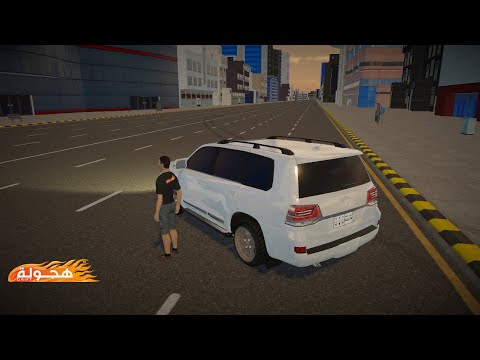
This second video shows a Toyota Land Cruiser 4x4 drifting — a Gulf favourite — and is a good look at how the bigger cars slide. No official RABABA Games trailer could be found on YouTube, so both videos here are fan gameplay, labelled honestly as such. Click the picture to watch on YouTube.
 ▶
Watch: Hajwala Drift — Toyota Land Cruiser 4x4 (Usama Games, fan gameplay)
Strategy 1: Learn in the desert before you touch traffic
This is the single most useful tip from the published player guides, and it is worth following exactly: start in the desert map, where there is plenty of open space and nothing to hit. Use the handbrake to start a slide at high speed, then counter-steer — steer into the slide — to hold the drift. Only once you can hold a slide in the desert should you take your skills to the highway and try weaving through traffic, which is where the style points are. Learning in traffic first just teaches you to crash.
Strategy 2: Smooth inputs beat speed
This is general drifting technique, not something specific to this game, and it matters here because the physics are loose — our Dinsun critic calls them wild, like driving on ice. Feather the throttle to hold your drift angle: stabbing it snaps the rear out and spins the car, and overcorrecting the steering straightens the car and kills the drift. Small, steady inputs keep the slide going; big ones end it. If you keep spinning out, you are almost certainly giving it too much throttle or too much steering, not too little.
Strategy 3: Pick any car — there is no best starter car to chase
There are more than 100 cars to choose from, and according to player reviews, all cars and maps are selectable without grinding for currency — the in-app purchases are VIP and Lite subscriptions, not car purchases. No reliable guide names a best beginner car for this game, so do not waste time hunting for one: pick a car you like the look of, learn the drift in it, and only then worry about tuning. If you are used to realistic drifting games like CarX, expect this one to feel very different — it is a showboating sandbox, not a simulator.
Strategy 4: Tune the car, not just the paint
Customisation is the game's strongest feature, and it goes beyond looks. The App Store listing says you can adjust front and rear spring strength, front and rear shock absorbers, raise or lower the car, and change tire camber, as well as paint and your character's appearance. Start with small changes — one setting at a time, then a practice run in the desert — so you can feel what each change does. No published guide gives verified tuning numbers for a specific setup, so treat anyone quoting exact spring or camber values with suspicion unless they show their work.
Strategy 5: Treat online as a showroom, not a race
Online rooms hold up to 8 players, with built-in voice and text chat. Think of them as a place to show off your car and your drifting, not as a competitive mode with a finish line — there is no ranked ladder to climb here. Player reviews also warn of lag in busy multiplayer rooms and high battery usage, so expect stutters when a room is full, and plug in if you plan a long session. The game also has Game Center enabled, and you can switch between day and night and control the weather for a different feel.
Walkthrough 1: Getting started — your first session
Download the game (about 1.7 GB, so use Wi-Fi) and open it. Create or sign in to your profile — the 4.2.9 update redesigned the login, profile and settings screens. Pick a car from the selection screen and head into Free Roam on the desert map. Spend your first few minutes just driving: get a feel for the steering, the throttle and the brake on the touch controls, and find the handbrake button before you need it in a hurry. Then try your first drift: build up speed in a straight line, tap the handbrake to break the rear loose, and counter-steer to hold the slide. Do not worry about style points yet — just learn what the slide feels like and how the car recovers.
Walkthrough 2: Holding a drift — the core skill
Everything in this game comes back to this one skill, so practise it in the desert until it clicks. First, get up to speed on open ground. Second, tap the handbrake to start the slide — a short tap, not a long hold. Third, counter-steer into the slide as soon as the rear steps out, and feather the throttle to keep the angle. Fourth, when the drift starts to die, add a little throttle; when the car starts to spin, ease off and straighten the steering slightly. Repeat the same corner or the same open stretch until you can hold a slide for several seconds. Once you can do that reliably, move to the highway and practise weaving through traffic, which is where the game rewards you with style points.
Walkthrough 3: Tuning and customising your car
When you can hold a drift, open the customisation screens. Change the paint and design first — that is the fun part and it costs nothing. Then try the tuning: adjust the front and rear springs, the shock absorbers, the ride height and the tire camber, one setting at a time, with a desert practice run after each change. There is no verified "best" setup published anywhere, so your goal is a car that feels right to you, not a magic set of numbers. While you are here, customise your character too — your avatar is part of the show in online rooms, and the game makes a point of it.
Walkthrough 4: The other modes — police chase, burnout and desert dunes
Beyond free drifting, the App Store listing names four more modes: Police chase, Off-road desert dune challenges, Burnout challenges, and Custom track creation. Try them in that order. Police chase puts you up against the law while you drift; Burnout challenges are about holding a burnout; the desert dune challenges take you off-road over the dunes; and Custom track creation lets you build your own track to drift on. A warning, stated honestly: no published guide explains the rules, scoring or win conditions for these modes in this game, so the guide cannot give you step-by-step tactics for them — and beware of guides for similarly named games, which describe different rules entirely. Explore each mode, learn its feel, and treat your first run as a scouting trip.
Walkthrough 5: Online play, custom tracks and showing off
Once you can drift and have a car you like, join an online room — up to 8 players, with voice and text chat built in. This is where the game is at its best and its messiest: players showing off cars and drifts, and, honestly, a lot of chaos. Customise your car and character before you join, because that is what other players see first. If you built a custom track, this is the place to share it. Try the day and night modes and the weather controls too — they change the look and feel of a session without changing the rules. And if a room is laggy, leave and join a quieter one rather than fighting the connection.
Stuck? A short checklist before you look anything up
First, if you keep spinning out, ease off the throttle and the steering — smooth inputs, not bigger ones. Second, if you cannot hold a drift at all, go back to the desert map and practise the handbrake-then-counter-steer sequence on open ground, away from traffic and walls. Third, if a mode confuses you, remember the rules are not published anywhere reliable — you are not missing a guide, the guide does not exist, so explore the mode and learn it by playing. Fourth, if the game lags or stutters, check whether you are in a full online room, and try a quieter room or solo play. And if a video or guide you find talks about gold currency, daily rewards or paying fines for impounded cars, it is describing a different, similarly named game — ignore it.
Have you mastered the drift, or are you stuck somewhere else in the game? Tell us in the comments — and if you want the next walkthrough, tell us which game from our iOS list you want covered next.