
Fill me up - Block Brain Game! is a block-fitting puzzle from Andrey Spencer: oddly shaped pieces arrive one at a time, and your job is to fit every piece onto the grid until the board is completely filled. The App Store description says it in three words — "simple.clean.fun" — and that is an honest summary. There is no story, no characters and no timer breathing down your neck, just a grid, a set of pieces, and the quiet satisfaction of a board with no gaps left. The catch is that the levels get awkward fast: the pieces stop being friendly rectangles, the board fills up in the wrong places, and one bad placement early on can leave a hole nothing fits into. This guide explains how the game works and how to think about every level, because there is no published per-level guide for this game anywhere — the walkthrough below teaches the system in phases instead of pretending there are fixed answers for fixed boards.
One honest note up front: our Dinsun critic scored Fill me up 42 out of 100 and rated its value proposition "Skip", calling it a generic block puzzle that feels more like a template than a finished game — simple rules anyone can understand and hundreds of levels, but zero innovation in a crowded genre, plain visuals, and repetitive level design. If you already have a polished block puzzle on your phone, this one will not replace it. If you like the genre and want a free, lightweight extra, or you are already playing it and stuck, this guide is for you.
Quick Facts
Developer: Andrey Spencer | Price: Free, with an in-app purchase to remove ads | App Store rating: 4.7 out of 5 (165 ratings) | Size: about 29.5 MB | Requires iOS 12.0 or later | Age rating: 4+ | Playtime: hundreds of numbered levels — the release notes mention fixes for levels 7, 10, 40 "and more". Current version is 3.3.0 (July 9, 2021). Game Center leaderboards are enabled, so your scores can be compared with other players.
Get Fill me up - Block Brain Game! on the App Store
This is an unofficial fan guide and is not affiliated with Andrey Spencer. How the app works comes from the App Store listing (version 3.3.0) and its release notes; the strategy tips below are general block-puzzle and tangram advice from published guides for games in the same genre, because no guide exists for this exact game — they are labelled as such wherever they appear. Prices and version details change with updates, so treat the numbers below as current as of November 2026, not gospel.
Watch the game first
There is no official trailer and no gameplay video of this exact game on YouTube that we could find, so the two videos below are general block-puzzle gameplay in the same genre — drag oddly shaped pieces onto a grid and clear lines. They show the kind of thinking this game asks for, even though they are not Fill me up itself. Click a picture to watch on YouTube.
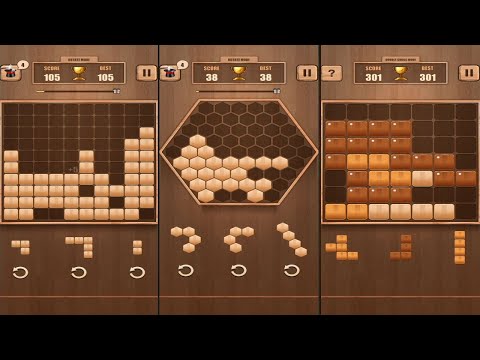 ▶
Watch: Wooden 100 Block gameplay (general block-puzzle video, andro-games — not Fill me up)
The second video is a look at 1010!, the best-known game in this family, and it is worth watching for one reason: the core skill is identical. You get a few pieces at a time, you place them on a grid, and a full row or column clears for points. Watch how the player holds pieces back and plans two moves ahead instead of dropping each piece the moment it appears.
 ▶
Watch: 1010: My Favourite Game (general block-puzzle video, hotcyder — not Fill me up)
A note on structure: Fill me up has numbered levels — the release notes for version 3.3.0 mention fixes for levels 7, 10, 40 "and more" — but no level-by-level guide exists for this game, and the board layouts are not documented anywhere. The "walkthrough" below therefore teaches the game in phases — early levels, mid-game, and the harder boards — instead of giving fixed per-level solutions that do not exist.
Strategy 1: Place the awkward pieces first
This is the single most useful rule in any block-fitting game, and it comes straight from the tangram and block-puzzle guides: start with the pieces that have the fewest places they can go. Long bars, L-shapes and pieces with a notch only fit in a handful of spots, while small squares and single blocks fit almost anywhere. If you place the easy pieces first, you will fill the obvious spots and then discover the awkward piece has nowhere left to go. Put the awkward pieces in first — corners and edges are their natural home — and save the small, flexible pieces to plug the gaps that remain. The guides phrase it as "start with the extremes" and "work from the corners and edges inward", and it applies to every board in this game.
Strategy 2: Big pieces first, small pieces last
The companion rule: when you have a choice, place the biggest piece before the smallest. Tangram guides say it plainly — place the large pieces first and save the small pieces for last — because a small piece can fill a one-cell hole at the end, but a big piece cannot squeeze into a space you have already chopped up. In Fill me up this means resisting the urge to tidy up with small pieces early. Leave the small pieces in your hand (or in the tray) as your insurance policy for the final gaps, and commit the large pieces while the board is still open.
Strategy 3: Build from the edges and keep the centre open
Do not start in the middle. The 1010! guides call this "perimeter dominance": build along the edges of the board and keep the centre open for as long as you can, because the centre is the most flexible space on the board and the edges are the hardest to fill later. A piece placed against an edge has its position fixed by the wall; a piece in the centre can always be shifted. If you fill the centre first, you end up with awkward pockets along the borders that nothing fits. Work the margins inward, and keep at least one decent open area in the middle for the big pieces that are still coming.
Strategy 4: Look at every piece before you place any of them
Before you drop a single piece, look at all the pieces you have been given for this board and plan the order. The 1010! guides warn against placing the first piece that looks good: consider all three options, consider the order, and only then commit. In Fill me up, that means checking whether a long piece needs a run of empty cells that your first placement would block, and whether two pieces need the same corner. Rotate each piece in your head — the game lets you swipe to rotate — before you commit it to the board, because a piece dropped in the wrong orientation is a piece wasted. If a placement boxes you in, the tangram guides' advice is to lift the piece and try a different spot rather than forcing the rest of the board around a bad decision.
Strategy 5: Keep room for the big pieces and clear lines together
Two habits from the 1010! guides that save boards. First, always keep room for a large block: the 3x3 square is the classic "board killer", and the guides warn to always maintain at least one 3x3 area of open space, or you will be handed a piece you physically cannot place. Second, when a full row or column is about to clear, try to clear two or more lines in one move — clearing multiple lines at once scores more than clearing them one at a time, and the cleared space gives you breathing room for the next pieces. And watch for single-cell holes: if a gap is smaller than your smallest remaining piece, an earlier placement needs to change — do not keep building around a hole nothing can fill.
Walkthrough 1: The first levels — learn the controls
Open the game and tap through to the level select. The early levels are the tutorial in all but name: small grids, simple pieces, and plenty of room. Use them to learn the two controls the App Store mirror describes — swipe to rotate a piece, drag to place it — and to learn the feel of the game: pieces snap into place on the grid, a completed row or column clears for points, and a level ends when the board is filled. Do not rush these levels. Practice rotating before placing, and practice the habit from Strategy 4: look at every piece first. The levels are numbered and the difficulty is uneven — the critic file notes some early levels are insultingly simple while others are tedious rather than challenging — so an easy level is not a sign you have mastered the game, it is a sign the game is still being gentle.
Walkthrough 2: The mid-game — when the boards get awkward
Somewhere in the first few dozen levels the pieces stop being friendly. This is where the strategies above start to matter, because the boards are still small enough to read at a glance but the pieces no longer obviously belong anywhere. Work in this order on every board: first, find the piece with the fewest possible homes and place it in a corner or along an edge. Second, place the next-largest awkward piece. Third, use the small pieces to fill the gaps, not the open spaces. Fourth, before each placement, check that you are not sealing off a run of cells a long piece will need, and that you are not creating a single-cell hole. If you reach a point where nothing fits, stop and rethink the last two placements instead of restarting immediately — the mistake is usually one piece back, not the whole board.
Walkthrough 3: The harder levels — planning beats speed
Past level 40 or so, the boards demand real planning. There is no timer, so use that: this game rewards the player who stares at the board for thirty seconds over the player who drops pieces quickly. Before each placement, ask three questions. Does this piece have another home if this spot goes wrong? Does this placement leave room for a 3x3 block? Does it create a hole smaller than my smallest remaining piece? If the answer to any of those is no, try a different spot or a different rotation. The difficulty curve is uneven, so a level that feels impossible is often just a level that needs one different opening move — replay it with the awkward pieces in a different corner and the board often falls into place.
Walkthrough 4: Ads, the remove-ads purchase, and leaderboards
The game is free, and the price of free here is ads: the version 3.3.0 release notes confirm there is an in-app purchase to remove them, though the App Store listing does not show the price, so we are not quoting one. If the ads bother you, the remove-ads purchase is the only in-app purchase the listing mentions — there are no coins, gems or level packs to buy. Game Center is enabled, so your scores go onto the leaderboards if you are signed in; that is the game's only competitive element, and the only reason to replay a level once you have cleared it is to beat your own score. Practical tip: the game is only about 29.5 MB and runs on iOS 12.0 or later, so it will run happily on an older iPhone or iPad — it is a good offline, low-demand puzzle for a commute, ads aside.
Walkthrough 5: What to do when you are stuck on a level
There is no hint button documented for this game, no undo confirmed, and no per-level solution published anywhere — so being stuck means rethinking, not looking up the answer. First, restart the level and change your opening move: put the awkward piece in a different corner, or place the second-largest piece first instead. Second, check your single-cell holes: if the board has a gap nothing can fill, the mistake was two or three placements ago, not the last one. Third, slow down and count: make sure every piece you still have can actually fit in the space that remains — if the total shape of your remaining pieces does not match the empty space, one of your placed pieces is in the wrong spot. And if a level is genuinely beating you, put the game down and come back: the boards are small, the solution is usually one rotated piece away, and a fresh look finds it faster than ten frustrated retries.
Stuck? A short checklist before you look anything up
First, check whether an awkward or long piece is still unplaced — if it is, restart and place it first, in a corner. Second, look for single-cell holes: a gap smaller than your smallest remaining piece means an earlier placement has to change. Third, check your open space: if there is no room left for a 3x3 block, you have built too far into the centre — restart and build from the edges instead. Fourth, remember there is no published per-level guide for this game, so do not waste time searching for one: the answer is in the strategies above, not in a video. And if the ads are the thing putting you off rather than the puzzles, the in-app purchase to remove them is the only purchase the game offers — or try one of the more polished games in the same genre, like 1010! or Woodoku, which our Dinsun critic would pick over this one.
Have you cleared all the levels, or are you stuck on a particular one? Tell us in the comments — and if you want the next walkthrough, tell us which game from our iOS list you want covered next.