
Car Parking - Driving School is a free driving simulator from Lavkush Gupta that mixes a driving school with an open-world car game. You learn 60+ real road signs, work through 100+ levels across Learn and Parking modes, take on jobs as a taxi, ambulance or school bus driver, and explore a big open-world city with 120+ cars to drive, customise and upgrade — plus multiplayer drag races and role-play with other players. It is free to download, with ads, in-app purchases and an optional Pro subscription, and it takes about 20 hours to work through the structured levels, according to our Dinsun critic.
This guide walks through every mode in order, phase by phase. A note on honesty first: no published per-level text walkthrough exists for this app's Learn and Parking levels, so instead of inventing a fixed solution for each of the 100+ levels, this guide teaches the systems each phase is built on — the road-sign lessons, the parking techniques, the jobs and the open world — using the App Store and Google Play listings, which agree on how the game works. Our Dinsun critic scored Car Parking - Driving School 58 out of 100 and called it a "Skip", mainly for clunky on-screen controls and heavy monetisation, while still crediting the car variety, the number of levels and the decent graphics. If you like parking simulators, this guide will help you get the most out of it without paying.
Quick Facts
Developer: Lavkush Gupta | Price: Free, with in-app purchases (including randomized items), ads and an optional auto-renewing Pro subscription | App Store rating: 4.6 out of 5 (about 175K ratings) | Size: about 1.7 GB | Requires iOS 15.0 or later | Age rating: 12+ | Version 9.21.3, updated November 20, 2026 | Playtime: about 20 hours for the structured levels.
Get Car Parking - Driving School on the App Store
This is an unofficial fan guide and is not affiliated with Lavkush Gupta. How the modes work comes from the game's App Store and Google Play listings, which agree with each other; the level phases below describe the systems the game teaches, not a fixed solution for each level, because no published per-level walkthrough exists for this app. The game changes with updates, so treat this as a working route through the game, not gospel.
Watch the game first
No official trailer for this game could be found, so both videos below are fan gameplay videos of the real game — the first shows the opening levels played in order, and the second shows open-world driving. Click the picture to watch on YouTube.
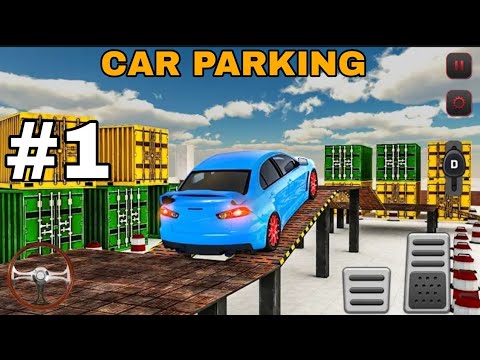 ▶
Watch: Car Parking Driving School Gameplay Part 1 — Levels 1 to 20 (GAMING Video)
The second video is open-world gameplay in an Aston Martin Vulcan, showing the city, the handling and the graphics at their best. Use it to see what the free-ride and multiplayer side of the game looks like once you are past the lessons. Click the picture to watch on YouTube.
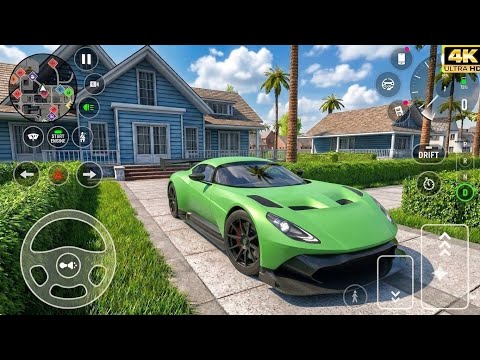 ▶
Watch: Aston Martin Vulcan — Car Parking Driving School Gameplay, 4K (Linklab Gaming)
Strategy 1: Slow is fast — tap, don't hold
Nearly every parking level is failed by speed, not by steering. The on-screen controls are sensitive — our Dinsun critic calls them clunky — so tap the throttle and the steering in short bursts instead of holding them down. A slow car gives you time to correct your angle before you clip a cone or a parked car, and a slow approach is the whole skill this game is testing. If you find yourself over-correcting in reverse, drop the steering sensitivity in the settings before your next attempt.
Strategy 2: Learn the road signs before you need them
The game teaches 60+ real road signs in Learn mode, and the lessons expect you to actually know them: recognise the sign, follow the traffic signal, mind the stop sign, use your blinkers. Treat Learn mode as the tutorial the rest of the game assumes you have finished. It is also the cheapest way to earn early coins and XP, because the lessons are short and repeatable, and knowing the signs means you stop losing time to avoidable mistakes in the later driving tests.
Strategy 3: Start small, upgrade handling first
With 120+ cars to choose from — SUVs, sedans, hatchbacks, MUVs, sports cars, buses, trucks and vans — the temptation is to buy the fastest car first. Don't. A small car is easier to park, and in Parking mode that matters more than top speed. When you do spend coins on upgrades, spend on brakes, tyres and suspension before engine power: stopping precisely and turning predictably is what clears levels. Body kits, rims, decals, wraps, underglow and coloured smoke are cosmetic — enjoy them, but they will not pass a level for you.
Strategy 4: Use the camera — never guess a gap
You can swipe to change the camera angle, and the game offers parking sensors and cruise control as assists. Before you reverse into a bay you cannot fully see, switch to a rear or top-down view and check the gap. Guessing costs more time than looking: one clipped bumper can fail a level you were about to pass. The same applies in the open world — a quick camera check before a tight turn through traffic saves you a speeding fine in police role-play.
Strategy 5: Play free first — earn coins from jobs, not your wallet
The game is free, but it is built to sell: ads, in-app purchases including randomized items, and an auto-renewing Pro subscription. You do not need any of that to finish the levels. Coins and XP come from completing levels, jobs and missions, so run Assignment mode (Walkthrough 3 below) between parking sessions to build your balance. If you do consider the Pro subscription, remember it renews automatically unless you cancel at least 24 hours before it ends, in your Apple account settings.
Walkthrough 1: Learn mode — the 60+ road signs
Start here. Learn mode is a set of short driving lessons, each built around a road sign or a traffic rule: stop lines, speed limits, one-way streets, no-parking zones, seat belts, indicators and right of way. The pattern of every lesson is the same. First, the sign is shown and explained. Then you drive a short marked route and apply it — stop at the stop line, signal before the turn, keep to the speed limit. Then the lesson is scored.
Three habits will carry you through all of Learn mode. Stop fully at every stop line and red light, even when the road looks empty — the lessons are checking the habit, not just the outcome. Signal before every turn, using the indicator control, because the game treats a missing signal as a mistake. And drive the route slowly: the lessons are not timed races, and a calm run with no faults beats a fast run with two. Finish Learn mode before you grind Parking mode, because the signs you learn here keep showing up in the later levels.
Walkthrough 2: Parking mode — the 100+ levels in phases
Parking mode is the core of the game: over 100 levels, shared with Learn mode, in which you drive to a marked bay and stop fully inside its lines without hitting anything. The levels get harder in phases, and each phase has one technique to master.
Early levels — straight-in bays. Wide lots, a marked bay straight ahead, no traffic. Drive slowly, line the car up with the bay from a distance, and roll straight in. Straighten the wheels before you enter the lines, then brake to a full stop inside them. This is where you learn the throttle: feather it, and stop earlier than you think, then inch forward.
Middle levels — reverse and parallel parking. The bay is behind you or alongside a kerb, and driving straight in no longer works. The technique is always the same: drive past the bay, stop with your car parallel to it, then reverse in slowly, turning the wheel as the rear of the car swings toward the space and straightening as soon as the car lines up with the bay borders. Use the rear camera view here, and the parking sensors — they exist for exactly this. If your approach angle is wrong, drive out and set up again; a bad angle is the most common reason for clipping a cone.
Later levels — traffic, one-way lanes and tight lots. Now there are moving cars, one-way lanes, cones and narrow gaps between parked vehicles, and some levels add a time limit. The rules from the earlier phases still apply, plus two more: follow the one-way arrows and the traffic signals on the route, and plan your line before you move — pick the wide entry that gives your rear axle room to clear the inner cones, then commit to it slowly. If a level keeps beating you, watch the first 20 levels in the gameplay video above: the early levels demonstrate the exact approach the later ones expect, just with more room.
Walkthrough 3: Assignment mode — jobs that pay
Assignment mode is where the game stops being a parking test and becomes a driving job. The missions include driving a taxi, an ambulance and a school bus full of children, plus deliveries, car transport, firefighter runs and garbage collection. Each job pays coins on completion, which is how you fund new cars and upgrades without spending real money.
Play jobs the same way you play the lessons: follow the route markers, obey the signs and signals on the way, and drive smoothly rather than fast. The ambulance and school bus jobs use bigger vehicles, so give yourself extra room at corners and brake earlier — a bus does not stop like a hatchback. Run a few jobs between parking sessions: they break up the repetition, they pay, and they teach you the city layout you will need in the open world.
Walkthrough 4: Open world and multiplayer — free ride, drift and drag races
Free Ride opens up the whole map: a big city, off-road routes, racing tracks, a desert airport area and the newer High Rise City: San Lucas, with day-night cycles and rain. There is no objective here — drive, explore, and practice. Try the drift challenges to earn drift points, and the Speed Traps and Airtime stunts for something to chase. You can also buy houses with garages to build your own driving base.
Multiplayer is the social side: challenge friends to drag races, join public or private rooms, and chat with players worldwide using live chat and direct messages. You can even exit your car, walk around, and ride as a passenger in another player's car. Two warnings from the listing itself: police role-play means speeding can earn you a fine, and the chat and user-generated content are unmoderated parts of the game, so younger players should stick to private rooms with friends.
Walkthrough 5: Cars, upgrades and customisation
There are 120+ cars, and the collection is the long-term goal. Buy cars with coins earned from levels and jobs, not with real money — the game hands out enough through play. Upgrade in this order: brakes and tyres first, then suspension, then transmission and exhaust, then engine. Tuning matters too: you can adjust suspension and camber to suit how you drive, so if a car feels twitchy in reverse, soften the setup before you blame the controls.
Customisation is deep but cosmetic: colours, number plates, rims, body kits, spoilers, exhausts, canards, decals, wraps, underglow and coloured smoke, plus character customisation with hairstyles, clothes and accessories. Spend on looks once your cars handle well — a fast car you cannot park is still a failed level.
Stuck? A short checklist before you look anything up
First, slow down: most failed levels are failed by speed, so retry at half throttle. Second, check the camera: switch to the rear or top-down view before reversing into a bay you cannot see. Third, check your approach angle: drive out and line up parallel to the bay before you start backing in. Fourth, check the sign: in Learn mode and the later levels, a missed sign or signal is a failed lesson, not a driving mistake. Fifth, check the car: a big bus or truck needs a wider line and earlier braking than the hatchback you started with. And if a written step is hard to picture, jump to the matching level in the Levels 1–20 gameplay video above — the first twenty levels show every technique the rest of the game builds on.
Have you finished Car Parking - Driving School, or are you stuck somewhere else in the game? Tell us in the comments — and if you want the next walkthrough, tell us which game from our iOS list you want covered next.